
Free, open source, for Windows, macOS and Linux
Catch infostealers in the act.
Infostealers are programs that sweep the saved passwords, crypto wallets and app logins off your PC and upload them, usually within seconds. ABA plants fake ones exactly where they look. Your own apps have no reason to open them. When something suspicious does, ABA freezes it, typically about a tenth of a second later.
ABA runs on Windows, macOS and Linux computers. See the downloads
Despite the name, keep Windows Defender on. ABA isn't an antivirus. It's the tripwire for what gets past one. Why both?
You're the stealer.
This is Sam's PC. Grab anything that looks valuable, then upload it. Somewhere in here are baits.
This is what a stealer finds on a PC running ABA. The ones marked bait are ABA's. With JavaScript on, you can try to rob it.
C:\Users\sam\Desktop
- passwords.txtbait
- invoice_march.pdfreal
C:\Users\sam\Documents
- wallet recovery phrase.txtbait
- Passwords.kdbxbait
- tax return 2025.pdfreal
…\Google\Chrome\User Data Sam uses Chrome
- DefaultLogin Data, Cookiesreal
- Profile 23Login Data, Cookiesbait
- Local Statereal
C:\Users\sam\AppData apps Sam doesn't have
- discord\Local Storage\leveldbbait
- Exodus\exodus.walletbait
- Telegram Desktop\tdatabait
- Opera Software\Opera Stablebait
C:\Users\sam
- .aws\credentialsbait
A demonstration that follows how the real ABA behaves. Freeze times are drawn from the 72–151 ms ABA measures in its tests. The real thing in action: a real stealer, frozen in 158 ms.
It's not an antivirus.
It's a better one.*
The name is a joke. Keep Windows Defender on.
Antivirus tries to stop malware before it runs. ABA is the tripwire for when something gets past it, and that's the part antivirus is bad at. They do different jobs. Use both.
Not a simulation
A real infostealer. Defender off.
Frozen in 158 ms.
Read what happens in the video
- Text on a black screen: “This is a real Discord token stealer. Windows Defender is off.”
- ABA is installed on a Windows 11 test machine with one command. Setup ends with “armed” and 18 bait files planted: fake passwords, wallets and tokens.
- The desktop. A file called “passwords” is highlighted: it's a bait.
- “Now the stealer.” A file called zombiesurvival.jar, which looks like a game, is double-clicked. A timer starts.
- About two seconds later a popup appears: “ABA: javaw.exe opened a bait”. It says the program read the Discord token store and, under “What ABA did”: “Froze it”. A red stamp reads “Frozen. 158 ms after it touched the bait. Before it could send anything.”
- “It went for the Discord token. A fake one. It's bait.”
- The popup asks what should happen. “Yes = Kill it” is clicked.
- ABA's full report in a terminal: what the program read, what launched it, its hash. It ends with “frozen, then killed”. A check for the stealer's process finds nothing.
- Closing text: “A Better Antivirus. Free and open source.”
How long is 158 ms?
That's how long the stealer in the video had between opening the bait and being frozen. Try to beat it: hit the pad the instant it turns red.
- You
- –
- ABA, in the video
- 158 ms
- ABA, in its tests
- 72–151 ms
Why it works
Infostealers grab first and upload last. ABA lives in the gap.
Infostealers (Lumma, RedLine, Vidar, StealC…) are the most common malware on personal PCs. They sweep your browsers, wallets, Discord and Telegram sessions and documents, zip it all up and upload it, usually within seconds.
Most of them collect first and upload at the end, and collecting means opening files in known places. ABA puts tripwires in exactly those places.
A typical infostealer's run
- Chrome profilecollected
- Documentscollected
- Discord tokena bait: frozen
- Walletsnever
- Telegramnever
- Zip it upnever
- Uploadnever
Four kinds of bait
-
passwords.txt · recovery phrase · 2FA codes · .kdbx
Fake files where file grabbers look
A password list on the Desktop, in Documents and in your home folder, a wallet recovery phrase, 2FA backup codes, a KeePass database. Every install names them differently, so they can't be skipped by name.
-
Opera · MetaMask · Exodus · Telegram · Discord · AWS
Fake app data for apps you don't use
Opera, Vivaldi and Yandex profiles with saved logins and cookies, MetaMask, Exodus, Electrum and Atomic wallets, Telegram sessions, Discord tokens, FileZilla servers, AWS keys. The app isn't installed, so nothing legitimate ever reads them. ABA checks what you have and never fakes those; install one later and it retires that decoy and tells you.
-
…\Chrome\User Data\Profile 23
A fake profile in the browsers you do use
A
Profile 23(or so) next to your real profiles in Chrome, Edge and Brave. Stealers take every profile folder; the browser only opens the ones it knows. It's the bait a stealer can't dodge by checking whether the app is really installed. -
optional · canarytokens.org
Canary tokens
The fake AWS keys and a link in
passwords.txtcan be real canarytokens.org tokens. If someone uses them later, you get an email, even if your PC was never online to tell you.
It catches infostealers by what they do, not by recognising the file. So it works on brand-new ones no antivirus has a signature for yet.
How it works
Inside the tenth of a second.
The instant freeze, on by default. Slowed down here; the real thing typically takes about 0.1 s.
- ABA holds a lock on every bait. An exclusive opportunistic lock, so Windows tells ABA the moment a file is opened.
- A program opens one. Windows pauses it inside the open and tells ABA at once.
- ABA notes which threads just got stuck, and lets go.
- The one that wakes at that exact instant is the opener: identified precisely, never guessed.
- If it's suspicious, it's frozen. Typically about 0.1 s after the open (72–151 ms in ABA's tests).
To stay safe, the instant freeze only acts on ordinary programs running as you without admin rights: never on system processes or on ABA itself, and if more than one program wakes at once it doesn't guess. A program that asks Windows not to pause it is found by the handle it's left holding. Everything else is caught by the backup: Windows' own file auditing (event 4663), which takes a few ms to about 1 s. No kernel driver, no background scanning, no CPU use while idle.
Then, in order
-
Judge how bad it is
Automatically, from what read the bait and how. What counts as critical
-
Freeze the whole thing
A stealer is rarely one process. ABA freezes the reader, what it started, the loader or script host that started it, and other running copies, and holds them where only ABA's service can thaw them.
-
Check before blaming
It verifies the code signature. A signed, legitimate app is unfrozen and just noted.
-
Take notes while it's frozen
Command line, parent processes, hash, network connections.
-
Respond
Block its internet, kill it or isolate the PC, as you chose.
aba releaseundoes everything. -
Tell you
A desktop popup, and your phone if you set it up: ntfy, Discord webhook, Pushover or email. Kill it, or It's mine to undo it all.
What counts as critical
- criticalAnything going through several apps' data within 2 minutes (a sweep), alone or split over several programs
- criticalUnsigned programs in Temp, AppData, Downloads, Desktop…
- criticalScript hosts and tools stealers hide in: PowerShell, cmd, mshta, rundll32, certutil, MSBuild…
- criticalTricks to read unseen, injected code in a Windows program, unsigned DLLs sideloaded by a signed app
- warnSigned apps in a user folder, scripting runtimes, other Windows programs in your session
- infoSigned, installed software in Program Files, Windows services
Behaviour beats identity. Stealers often hide inside a legitimate program, so who opened a bait can lie. What it opened can't: a process that reads several different apps' baits is stopped as a stealer whatever it claims to be.
You choose how hard it hits
| Preset | Critical | Warn |
|---|---|---|
| Alert only | notify | notify |
| Balanced default | freeze + block its internet | notify |
| Strict | freeze + block + isolate the PC | freeze |
Isolation uses the Windows Filtering Platform, survives reboots so malware can't wait it out, and still lets ABA's phone alert through.
Honest limitations
Where it stops.
It's a tripwire, not a shield. Know its edges before you rely on it. The full list is in the README.
-
It only catches infostealers that touch a bait
A stealer that only grabs your real browser data and never touches a bait won't trip it. ABA is open source, so a stealer can be written to know it. What it can't do cheaply is tell which files are baits. But one that reads each browser's own list of profiles, takes only those and nothing else on the PC, stays under the wire.
-
A fast stealer may get something out first
With the instant freeze, a stealer is frozen about 0.1 s after it opens a bait (it gets the fake contents, not your real data). Without it, a few ms to about 1 s. One that uploads each item the moment it reads it may send something first; freezing stops what it hasn't sent yet.
-
It can't beat malware with admin rights
Malware running as administrator can stop the service, clear the audit policy or remove filters. ABA alerts if auditing is switched off, but it can't defend against an attacker who already owns the machine.
-
The instant freeze is deliberately cautious
It skips programs running as administrator and anything it can't pinpoint with certainty. Those are still caught by the event-log path, just a little later.
-
Injected code is judged by its results
Watching one process write code into another needs a kernel driver or Microsoft's protected-antivirus signing; ABA has neither. It catches injected stealers by what they read and by the code they leave in Windows programs' memory. That check skips programs that legitimately generate code (.NET, Java, browsers), and module stomping and process ghosting get past it (the sweep rule still applies). A stealer injected into an app you trusted, reading only the one bait you trusted it with, would get through.
explorer.exeand a few other desktop processes are never frozen; their internet is cut instead. -
A reader that's already gone can't lead to its parent
If a reader exits before its event arrives, on a PC where the instant freeze couldn't single it out, it's reported and its file's internet is cut, but whatever started it isn't known.
-
If the service is killed mid-incident, what it froze is ended
A hold nobody is left to release would otherwise stay frozen for good. Only a crash or kill does this; stopping, updating or reinstalling releases holds properly.
-
Some of your own software reads files
Backup, sync and search tools can trip a bait. One click on It's mine handles it. A backup tool that copies all of AppData looks like a sweep until you allow it.
-
~/.aws/credentialsis quieterEvery AWS SDK reads it, so a signed program reading it is only logged. Unsigned programs, script hosts and runtimes still trip it.
-
Popups need you to be signed in
Detections are always logged, phone alerts always go out, and responses happen either way.
-
Low profile, not hidden
The service is called “File Access Monitor” so it doesn't advertise itself to malware that checks for honeypots. It's fully visible to you.
Download
Set the trap.
Free. No account. No telemetry. Setup takes about a minute.
-
Download ABA-Setup.exeOne installer for x64 and ARM64 · from GitHub Releases
Windows 10 & 11
Available Your systemThe newest version, straight from ABA's releases on GitHub. It shows up as “A Better Antivirus” in Windows' installed apps.
-
Download ABA-macOS.pkgApple silicon and Intel · signed and notarized by Apple
macOS 14+
Early Your systemOpens without a warning. ABA needs Full Disk Access: switch it on for “File Access Monitor” in System Settings → Privacy & Security.
-
Linux
Early Your systemcurl -fsSL https://raw.githubusercontent.com/vulnix0x4/a-better-antivirus/main/install.sh | shNeeds systemd. The script checks the release's signature before it runs anything (read it first). Also as
.deb,.rpmand a tarball on GitHub Releases.
On Windows: after you click download
-
Open
ABA-Setup.exeIt's in your Downloads folder. Your browser may say the file isn't commonly downloaded: choose to keep it.
-
Windows will warn you. That's expected, for now.
ABA's installer isn't code-signed yet; an application for free open-source signing is pending. Until then Windows doesn't recognise the file and shows its blue SmartScreen warning.
- Click More info.
- Check the app is
ABA-Setup.exe, then click Run anyway.
Windows protected your PC
Microsoft Defender SmartScreen prevented an unrecognized app from starting. Running this app might put your PC at risk.
Run anywayDon't run
A drawing, not a screenshot: what you'll see after More info. Smart App Control. On Windows 11 PCs where Smart App Control is switched on, Windows can block an unsigned installer outright, with no Run anyway. If that happens, ABA can't be installed on that PC until signing arrives. We don't suggest switching Smart App Control off for it.
Be sure first: check the file's SHA-256
Every release lists the SHA-256 fingerprint of each file. If yours matches, it's the same file, byte for byte.
- Open SHA256SUMS.txt from the latest release and find the line ending in
ABA-Setup.exe. - In PowerShell (Start, type PowerShell, Enter), run this. It only reads the file:
(Get-FileHash "$HOME\Downloads\ABA-Setup.exe").Hash - The two must match (capital or small letters don't matter). If they differ, don't run the file.
The list itself is signed with ABA's release key (
SHA256SUMS.txt.sig). How releases are protected. -
Say yes to the admin prompt
ABA needs administrator rights to install its background service and plant the baits.
-
Answer two questions
Recommended asks just two things, phone alerts and automatic updates, and uses sensible defaults for the rest. Customize lets you pick every bait and response.
-
Watch it catch a harmless fake stealer
Setup ends by offering a safe test. Here's what it prints:
PS C:\Users\you> aba test

 A harmless copy of ABA in your Temp folder is about to read passwords.txt on the Desktop, exactly the way a stealer would. Nothing leaves your PC and your network isn't touched.

 ✓ Caught      critical: unsigned program running from a user-writable folder: typical of stealers
 ✓ Frozen      72 ms after it opened the bait, before it could read a byte
 ✓ Alerted     popup on your desktop, and your phone (ntfy)
 ✓ Cleaned up  the fake stealer was killed and deleted
Try
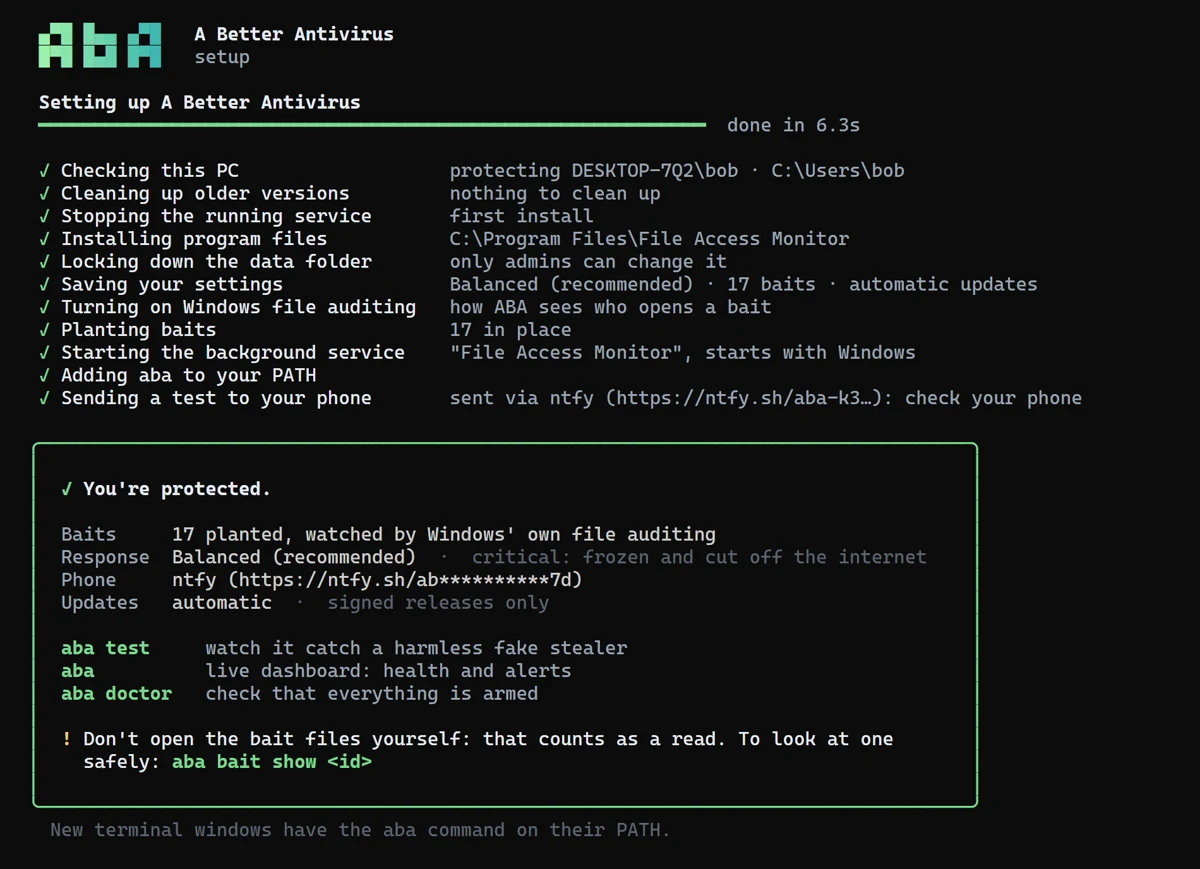
The real end of setup.
One rule afterwards: don't open your bait files. That's a read, and ABA will react. To see what's in one, use aba bait show <id>. Remove it all with aba uninstall.
For technical users: install from PowerShell
irm https://raw.githubusercontent.com/vulnix0x4/a-better-antivirus/main/install.ps1 | iexIt downloads the latest release for your PC, checks it against the release's SHA256SUMS.txt, and starts the setup. Read the script first if you like.
Only ever paste irm … | iex commands from sources you trust. It's also how many stealers get installed (“paste this to fix your PC”). This one is in the open, short, and refuses to run a download whose checksum doesn't match.
Everything it touches
What ABA changes on a Windows PC.
This is all of it. aba uninstall undoes it.
| What | Where | On uninstall |
|---|---|---|
| Program | C:\Program Files\File Access Monitor | removed |
| Service | FileAccessMonitor, runs as LocalSystem, starts with Windows | removed |
| Data, alerts, logs | C:\ProgramData\FileAccessMonitor, admins only | alerts kept unless --purge |
| Audit policy | “Audit File System: Success” | restored to what it was |
| Baits | your folders and fake app folders | removed (files you made are kept) |
| Firewall filters | WFP provider “A Better Antivirus”, only while responding | removed |
| PATH | adds the program folder | removed |
What goes over the network
- Phone alerts, if you set them up.
- Canary token creation, if you opt in (your email goes to canarytokens.org).
- With automatic updates on, one request a day to
api.github.com.
Nothing else. No telemetry.
This site keeps the same promise: no analytics, no trackers, nothing loaded from anywhere else. Even the font and the video are served from here.
Read every line
MIT licensed. Source on GitHub.
Signed updates only
An update installs only if
SHA256SUMS.txtcarries a valid ed25519 signature from ABA's release key and the file matches it. It never downgrades and rolls back if the new version doesn't start.Tested on real Windows
Every push runs a full install, fake stealers, freeze, kill, isolate and uninstall on a real Windows machine.
Found a way around it?
ABA runs with system rights, so bugs matter. Report them privately: security policy.